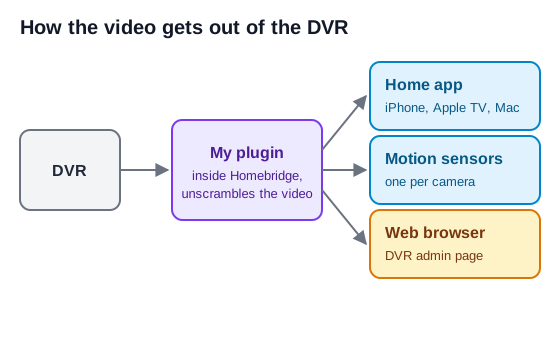
I now have four more cameras in the Home app and on the Apple TV. The DVR's own admin page works in a browser again, and I can restart my routers by voice. Claude Code wrote all of the code. The plugin is on npm as homebridge-hikvision-dvr and the source is on GitHub. I tested it on my own devices and ran every release.
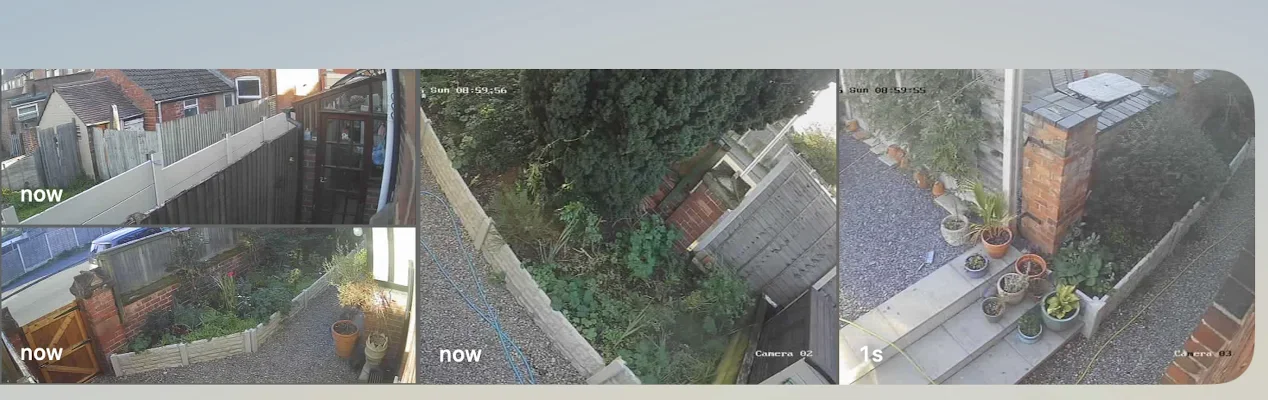
# Live video never worked
The cameras plug into a HiLook DVR, the box that records them. I wanted them in the Home app so they sat next to everything else. Apple's Home app only knows about devices that support HomeKit, so I add other things through Homebridge, free software that runs on a computer at home and makes them look like HomeKit devices. A plugin tells Homebridge about each kind of device.
I tried several camera plugins, including homebridge-camera-ffmpeg, and go2rtc as well. They all showed thumbnails and never any live video. I don't know the make or model of the cameras, because the DVR doesn't report them.
# The video was scrambled
The DVR had its video encryption setting on, which scrambles the video using a key made from a code on the DVR's sticker. The HiLook phone app knows the code, so it plays. Everything else gets noise. Thumbnails come from a separate request that isn't scrambled, which is why they always worked.
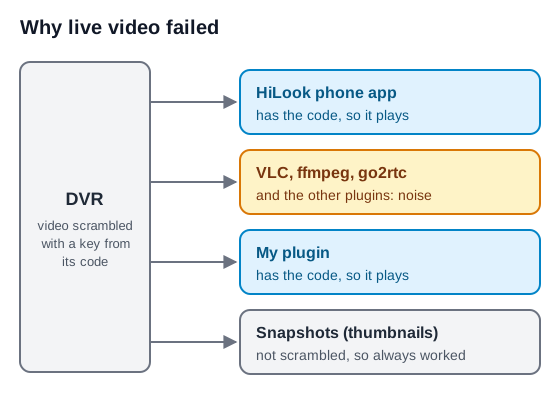
Everything looked like a problem with the video format at first. The plugin now unscrambles the video itself, using the same code. Nothing changes on the DVR and the HiLook app keeps working.
# Making it fast
The pictures were slow to appear. The Apple TV can show all four cameras at once as a grid of live tiles, and that grid froze. I measured these on a Raspberry Pi 3 A+, the small computer I first ran Homebridge on.
| Before | After | |
|---|---|---|
| First picture, one camera | 2.5 seconds | 0.5 seconds |
| First picture, each tile in a grid | 2.6 to 5 seconds | 0.7 to 0.9 seconds |
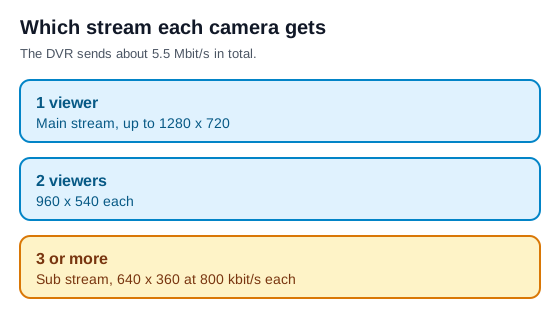
The DVR sends about 5.5 Mbit/s in total, so several main streams at once gave about 13 frames a second each. The plugin now picks the stream by how many cameras are being watched at once, so each tile gets a smaller picture that fits. After that, all four Apple TV tiles showed Live with the on-screen clocks ticking.
If the Pi's hardware video encoder gives nothing within 8 seconds, the plugin switches to software encoding. When the encoder crashed, every stream hung until I added that.
# The DVR's admin page
The DVR's admin page depends on a browser plugin that no current browser can run, so live view, playback and drawing motion areas all failed. The plugin has an optional web console that serves the DVR's own page and replaces the missing browser plugin. With the console I can watch live video, play back recordings and draw motion areas from Safari or Chrome without installing anything.
It has its own HTTPS name on my home domain, so there's no browser warning. The console can log in automatically with the plugin's saved DVR account, which means anyone on my home network can then use it. That's off by default.
# Motion sensors
The plugin gives each camera a HomeKit motion sensor, driven by the DVR's own detection. The DVR only sends motion to other software if I tick "Notify Surveillance Center" under Configuration, Event, Motion, Linkage Method, so the sensors stay quiet until it is ticked. At start-up the plugin lists in the Homebridge log any cameras that still need it. I haven't counted missed or false alerts.
# Moving off the Pi
The Raspberry Pi was fine for one camera at a time and struggled with the Apple TV grid. I moved Homebridge to an Ubuntu 26 server in my server room. It has Intel graphics, which the plugin uses for encoding. A 1080p stream costs about 0.3 of a core on the graphics chip, against 0.6 to 0.8 of a core at 720p in software. I've retired the Pi. Homebridge there has its own bridge for the cameras, and I add the heating sensors one at a time.

# Restarting the routers from Siri
I asked for a plugin to restart my two routers and show their status. It's private because it's too specific to my house to be any use to anyone else. The restart goes through a relay machine, and the SSH keys on it can only read the status or reboot, so nothing can open a shell on the router. Siri shortcuts read the status aloud.